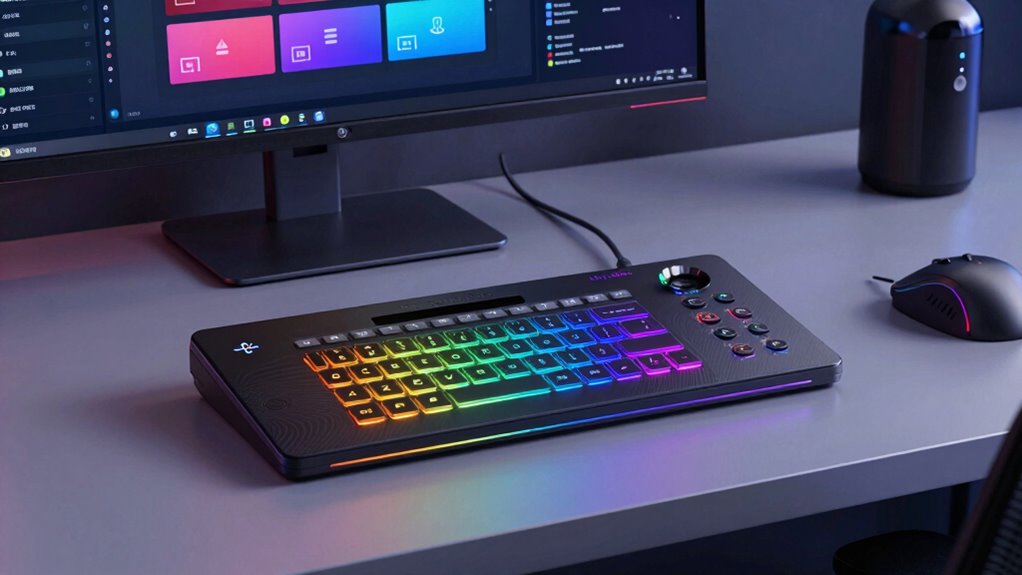

For creators looking to streamline their streaming, content creation, or production workflows, a dedicated stream deck can be a game-changer. The Elgato Stream Deck XL stands out as the best overall choice with its extensive button array for complex setups, while the Stream Deck Mini offers a compact, budget-friendly option for newcomers. The main tradeoffs involve size versus customization — larger models provide more control at a higher cost, while smaller units are simpler but less versatile. Keep reading for a detailed breakdown of each option and how they compare for different creator needs.

Get smart everyday buys delivered free with Prime
- Fast, free delivery on millions of items
- Prime Video, Amazon Music and more included
- Member-only deals all year
Key Takeaways
- Larger stream decks like the XL models excel for complex workflows but come with higher prices and desk space requirements.
- The Mini offers a surprisingly capable experience for beginners or streamers with limited space, though it sacrifices customization options.
- Compatibility with both Mac and PC is common, but support for specific software modes varies, influencing usability.
- Build quality and tactile feedback differ, impacting long-term durability and user experience.
- Price varies significantly, making it important to match features with actual workflow needs to avoid overspending.
| Elgato Stream Deck + XL Control Platform |  | Best Overall for Customization and Power | Number of macro keys: 36 | Multifunction dials: 6 | Touch strip display: Yes | VIEW ON AMAZON | See Our Full Breakdown |
| Elgato Stream Deck MK.2 Studio Controller, 15 Macro Keys |  | Best for Versatile Control in Compact Size | Number of Keys: 15 | Dimensions: 118 x 84 x 25 mm | Weight: 145 g without stand / 270 g with stand | VIEW ON AMAZON | See Our Full Breakdown |
| TreasLin VSDinside Macro Keyboard Stream Controller Deck with 18 Customizable Macro Keys |  | Best for Multi-Mode Versatility and Productivity | Number of Keys: 18 | Button Types: 15 LCD visual buttons, 2 tap buttons, 1 rotary button | Supported Modes: Numeric, Calculator, Stream Controller | VIEW ON AMAZON | See Our Full Breakdown |
| Elgato Stream Deck Neo, 8 Customizable Keys, 2 Touch Points |  | Best for Smart Control and Simple Automation | Number of Keys: 8 | Touch Points: 2 | VIEW ON AMAZON | See Our Full Breakdown | |
| Elgato Stream Deck XL Advanced Studio Controller, 32 Keys |  | Best for Professional Live Production | Number of Keys: 32 | Connectivity: USB 3.0 | Dimensions: 7.17 x 4.41 x 1.34 inches | VIEW ON AMAZON | See Our Full Breakdown |
| Elgato Stream Deck Mini, 6 Customizable LCD Macro Keys |  | Best Compact for Beginners | Number of Keys: 6 | Connectivity: USB | Dimensions: 84 x 60 x 58 mm | VIEW ON AMAZON | See Our Full Breakdown |
| stream decks for creator | Connectivity | Number of Keys | Weight | Dimensions |
|---|---|---|---|---|
| Elgato Stream Deck + XL Contro | Supports integrations with apps and equipment | — | — | — |
| Elgato Stream Deck MK.2 Studio | USB 2.0 | 15 | 145 g without stand / 270 g with stand | 118 x 84 x 25 mm |
| TreasLin VSDinside Macro Keybo | USB-C | 18 | 130 g | — |
| Elgato Stream Deck Neo | — | 8 | — | — |
| Elgato Stream Deck XL Advanced | USB 3.0 | 32 | 14.46 oz | 7.17 x 4.41 x 1.34 inches |
| Elgato Stream Deck Mini | USB | 6 | 160 g | 84 x 60 x 58 mm |
More Details on Our Top Picks
Elgato Stream Deck + XL Control Platform
The Elgato Stream Deck + XL stands out for its extensive array of controls—36 macro keys, six multifunction dials, and a touch strip—making it the most flexible choice for creators who want to tailor workflows precisely. Compared to the Elgato Stream Deck XL, this model offers more input options and unlimited profiles, ideal for multi-project streamers or professionals managing complex setups. However, its complexity can be daunting for beginners, and the premium price makes it less accessible for casual users. This control platform is perfect for seasoned streamers or editors who need comprehensive management over their tools and scenes, but it might overwhelm someone just starting out.
Pros:- Highly customizable controls for complex workflows
- Supports unlimited profiles for different projects
- Includes multifunction dials and a touch strip for real-time info
- Extensive app and device integrations
Cons:- Setup can be complicated for new users
- Requires dedicated software installation
- High price point may deter casual users
Best for: Advanced streamers or content creators with complex workflows requiring extensive customization.
Not ideal for: Beginners or casual users who prefer simple controls without a steep learning curve.
- Number of macro keys:36
- Multifunction dials:6
- Touch strip display:Yes
- Custom profiles:Unlimited
- Connectivity:Supports integrations with apps and equipment
Our verdict“This pick is best suited for experienced creators who need maximum control and customization over their streaming setup.”
Elgato Stream Deck MK.2 Studio Controller, 15 Macro Keys
The Elgato Stream Deck MK.2 offers a balanced mix of customization and portability with 15 LCD keys, making it ideal for creators who want a compact yet powerful control device. Unlike the Stream Deck XL, which provides more keys, this model emphasizes ease of use and quick setup, supported by visual feedback and a wide range of plugins. Its USB-C connection ensures fast response times but may require adapters on some setups, and with only 15 keys, it might fall short for users needing extensive controls. This makes it well-suited for streamers who want a small yet versatile device to manage multiple apps without overwhelming their workspace.
Pros:- 15 highly customizable LCD keys
- Supports a wide range of plugins and integrations
- Visual feedback confirms actions instantly
- Compatible with both Mac and Windows
Cons:- Limited to 15 keys, may be insufficient for complex workflows
- Requires USB-C connection, possibly needing adapters
- Plastic enclosure feels less premium
Best for: Streamers or content creators seeking a portable, customizable control surface with clear visual feedback.
Not ideal for: Power users needing dozens of macros or those with limited desk space who prefer larger control panels.
- Number of Keys:15
- Dimensions:118 x 84 x 25 mm
- Weight:145 g without stand / 270 g with stand
- Connectivity:USB 2.0
- Compatibility:macOS 10.15+, Windows 10
- Interface:USB-C
Our verdict“This is an excellent choice for creators who want a compact, flexible control deck with great visual cues and broad app support.”
TreasLin VSDinside Macro Keyboard Stream Controller Deck with 18 Customizable Macro Keys
The TreasLin VSDinside macro keyboard impresses with its ability to switch among three distinct modes—numeric, calculator, and stream control—making it highly adaptable for streamers and professionals alike. Compared with the Elgato Stream Deck MK.2, which focuses on app-specific controls, this model emphasizes mode switching, offering a broader scope of functions within a single device. Its 18 macro keys with dynamic icons and rotary controls support complex macro setups and media controls, but it relies on active Spotify Premium for Spotify integrations and uses USB-C, which may require adapters. This device is best for users who want flexible, multi-purpose functionality in a single, customizable setup.
Pros:- Supports three operating modes for versatility
- 18 customizable macro keys with dynamic icons
- Includes rotary control for media and scene switching
- Compatible with major streaming and editing software
Cons:- Requires active Spotify Premium for Spotify controls
- Limited to USB-C, may need adapters
- Could be complex for users who only need simple controls
Best for: Streamers or productivity-focused users who need adaptable controls across different modes for varied tasks.
Not ideal for: Casual streamers or users without active Spotify Premium, as Spotify integration requires a subscription.
- Number of Keys:18
- Button Types:15 LCD visual buttons, 2 tap buttons, 1 rotary button
- Supported Modes:Numeric, Calculator, Stream Controller
- Connectivity:USB-C
- Compatibility:PC, Mac
- Weight:130 g
Our verdict“This device suits creators who want a multi-mode macro keyboard capable of handling diverse workflows efficiently.”
Elgato Stream Deck Neo, 8 Customizable Keys, 2 Touch Points
The Elgato Stream Deck Neo offers a streamlined experience with 8 customizable keys and 2 touch points, making it ideal for creators who want quick access to essential commands without clutter. Its seamless integration with apps like Zoom, Office, and Adobe Creative Suite enhances productivity, especially in multi-application workflows. Compared to larger decks like the Stream Deck XL, the Neo’s smaller footprint is perfect for tight spaces or minimal setups. However, its limited number of keys means fewer controls for complex tasks, and setup can require some initial configuration. This device is best for users who prioritize smart control and quick automation over extensive macro options.
Pros:- Highly customizable keys and touch points
- Easy drag-and-drop setup
- Supports popular apps and smart home devices
- Compact and space-efficient design
Cons:- Limited controls for complex workflows
- Requires initial setup and configuration
- Restricted to specific ecosystems
Best for: Content creators focused on productivity and smart control in a compact form factor.
Not ideal for: Streamers needing extensive macro controls or managing complex multi-scene setups.
- Number of Keys:8
- Touch Points:2
Our verdict“This is a smart, efficient choice for creators seeking quick automation and control in a small package.”
Elgato Stream Deck XL Advanced Studio Controller, 32 Keys
The Elgato Stream Deck XL with 32 LCD keys is designed for creators who need comprehensive control over live streams and production environments. Its extensive button array allows quick triggering of scenes, overlays, and platform commands across OBS, Twitch, and YouTube, rivaling larger setups like the Stream Deck + XL Control Platform. While its 32 keys cover most control needs, the device’s size and weight make it less portable, and its premium price may be a barrier for casual users. Its visual feedback and broad software support make it ideal for professional streamers or content studios that require reliable, multi-layered command execution in a fixed setup.
Pros:- Large array of 32 customizable LCD keys
- Supports a wide range of platform integrations
- Visual feedback enhances reliability
- Compatible with Windows and macOS
Cons:- Size and weight limit portability
- High cost for casual users
- Design may be bulky for small setups
Best for: Professional streamers and content creators managing complex live production workflows.
Not ideal for: Casual or mobile creators who need a lightweight, portable control solution.
- Number of Keys:32
- Connectivity:USB 3.0
- Dimensions:7.17 x 4.41 x 1.34 inches
- Weight:14.46 oz
- Compatible Operating Systems:Windows 10, macOS 10.13+
- Power Source:USB powered
Our verdict“This device is perfect for professionals who need a powerful, reliable control panel for high-stakes live production.”
Elgato Stream Deck Mini, 6 Customizable LCD Macro Keys
The Elgato Stream Deck Mini stands out for its simplicity and portability, making it an excellent entry point for new streamers or creators with limited space. Compared to larger options like the Elgato Stream Deck + XL, it offers fewer keys, which means fewer quick-access commands—adequate for basic streaming setups but restrictive for more complex workflows. Its intuitive software makes setup straightforward, and its small footprint ensures it fits easily on crowded desks. However, the limited number of keys can become a bottleneck as your needs grow, and the necessity of a USB connection reduces portability without a hub. Designed mainly for streaming, it’s less suited for multi-tasking beyond basic commands. This pick makes the most sense for creators starting out or with minimal command needs.
Pros:- Highly customizable keys for quick access to commands
- Easy to set up and personalize with user-friendly software
- Compact and lightweight design suitable for small desks
- Compatible with major streaming apps like OBS, Streamlabs, Twitch, and YouTube
Cons:- Limited to only 6 keys, restricting advanced workflows
- Requires USB connection, limiting portability without an extra hub
- Primarily designed for streaming, less useful for non-streaming tasks
Best for: Beginners or streamers who want a compact, easy-to-use device for basic commands
Not ideal for: Power users or multi-streamers who need extensive customization and numerous keys for complex workflows
- Number of Keys:6
- Connectivity:USB
- Dimensions:84 x 60 x 58 mm
- Weight:160 g
- Supported Apps:OBS Studio, XSplit, Streamlabs, Twitch, YouTube
- System Requirements:macOS 10.15 or newer, Windows 10 (64-bit)
Our verdict“This is an ideal choice for newcomers or creators with simple, streamlined command needs who prioritize portability.”
How We Picked
To determine the best stream decks for creators, I evaluated each model based on key factors such as build quality, customization flexibility, ease of use, compatibility, and value for the price. I prioritized products that enhance productivity and streamline common tasks during live streams or content creation. The ranking reflects a combination of versatility, user experience, and cost-effectiveness, ensuring that both beginner and advanced creators can find suitable options. Larger decks with more keys generally rank higher for complex workflows, while compact options appeal to those with limited space or budget constraints.| stream decks for creator | Connectivity |
|---|---|
| Elgato Stream Deck + XL Contro | Supports integrations with apps and equipment |
| Elgato Stream Deck MK.2 Studio | USB 2.0 |
| TreasLin VSDinside Macro Keybo | USB-C |
| Elgato Stream Deck Neo | — |
| Elgato Stream Deck XL Advanced | USB 3.0 |
| Elgato Stream Deck Mini | USB |
Factors to Consider When Choosing Stream Decks For Creators
Choosing the right stream deck depends on your specific workflow, workspace, and budget. While all these devices serve the core purpose of simplifying control, not every model suits every creator equally. Consider how many functions you need to access simultaneously, your comfort with customization, and the amount of desk space available. By weighing these factors, you can select a device that boosts productivity without overwhelming your setup or budget.Size and Number of Keys
The size of the stream deck and the number of keys directly impact how many commands or shortcuts you can assign. Larger models like the XL provide extensive control for complex productions but require more desk space and often come with higher costs. Smaller options like the Mini are more portable and budget-friendly, ideal for basic functions or mobile setups. Match your workflow needs with available space to avoid overspending on unnecessary features or missing out on needed controls.
Customization and Software Compatibility
Most stream decks offer customizable buttons with icons or text, but the ease of editing and the variety of supported actions vary. Look for models that support your preferred streaming or editing software, such as OBS, Streamlabs, or Adobe Premiere. Devices with open SDKs or broader app integrations provide more flexibility. Avoid models with limited software support, which can restrict functionality or complicate setup. Remember, more customization options often mean a steeper learning curve, so consider your comfort level.
Build Quality and User Experience
Durability matters for devices that see daily use. Higher-end models often feature metal or reinforced plastic cases, providing a more robust feel and longer lifespan. Tactile feedback from buttons influences how confidently you can operate the device during intense streaming sessions. Poorly built units may develop issues over time or feel cheap, diminishing the overall experience. Test or read reviews about the feel of the buttons and overall construction before purchasing.
Connectivity and Power
Most stream decks connect via USB, but some offer additional features like wireless control or powered hubs. Consider whether your PC or Mac has sufficient USB ports and whether the device requires external power. Devices with multiple connections or power adapters may offer more stability or additional features, but also add complexity. For portable or mobile setups, a bus-powered device simplifies setup, while stationary studios might benefit from dedicated power sources for consistent performance.
Price and Value
Prices range from budget-friendly Mini models to expansive XL decks costing several hundred dollars. Evaluate whether the additional keys and features justify the higher cost for your specific use case. Sometimes, investing in a larger deck makes sense for professional setups, but casual streamers or solo content creators may find a smaller, more affordable device sufficient. Avoid overpaying for features you won’t utilize, but also beware of the limitations of cheaper models that may require upgrades sooner.
Frequently Asked Questions
Can I customize my stream deck with any software?
Most popular stream decks come with dedicated software that allows for extensive customization, supporting a wide range of actions like launching apps, switching scenes, or controlling audio. Compatibility with third-party apps varies, so it’s important to verify that your preferred tools are supported. Some devices also support third-party plugins or SDKs that expand functionality further. If customization is a priority, opt for models with open or broad software support to maximize flexibility.
Will a larger stream deck fit on my desk?
Size is a key consideration when selecting a larger deck like the XL. These models can take up significant desk space, which might be problematic in smaller setups. Measure your workspace carefully and compare it with the dimensions of the device before purchasing. If your desk is limited, a smaller model like the Mini or Neo can still provide useful controls without cluttering your workspace. Remember, a cluttered desk can hinder workflow, so choose a size that balances functionality with available space.
Are wireless stream decks available?
While most stream decks connect via USB, some models or third-party solutions offer wireless capabilities. Wireless units can reduce cable clutter and increase flexibility, especially in mobile or multi-location setups. However, wireless connections may introduce latency or stability issues, which could impact live control during streams. Carefully consider whether the convenience outweighs potential performance tradeoffs, and check for robust wireless protocols if you opt for this feature.
Is a more expensive stream deck worth the investment?
Higher-priced models generally offer more keys, better build quality, and advanced customization options, which benefit professional streamers or those with complex workflows. If you frequently switch scenes, run multiple applications, or need dedicated controls for audio and video, investing more can save time and improve stream quality. Conversely, casual creators or beginners may find a less expensive model perfectly adequate, avoiding unnecessary expense while still gaining significant control benefits.
How long do stream decks typically last?
Most stream decks are built for long-term use with durable materials, and their lifespan depends on usage frequency and build quality. High-end models with metal or reinforced plastics tend to last longer and withstand daily use. Proper maintenance, such as keeping the device clean and avoiding excessive force on buttons, can extend its lifespan. Reading user reviews for insights into long-term durability can also inform your choice, especially if you plan to use the device intensively.
Conclusion
For those seeking a versatile, all-around performer, the Elgato Stream Deck XL makes the most sense, offering extensive controls for professional setups. If budget or space is limited, the Stream Deck Mini provides a surprisingly capable experience without breaking the bank. Beginners or casual streamers will appreciate the Stream Deck Neo for its simplicity and touch controls, while advanced users with complex workflows should consider the XL models for maximum customization. Content creators who prioritize professional-grade build quality and extensive features should opt for the premium options, while hobbyists or newcomers can start smaller and upgrade later.
Fall Picks
fall essentials
As an affiliate, we earn on qualifying purchases.