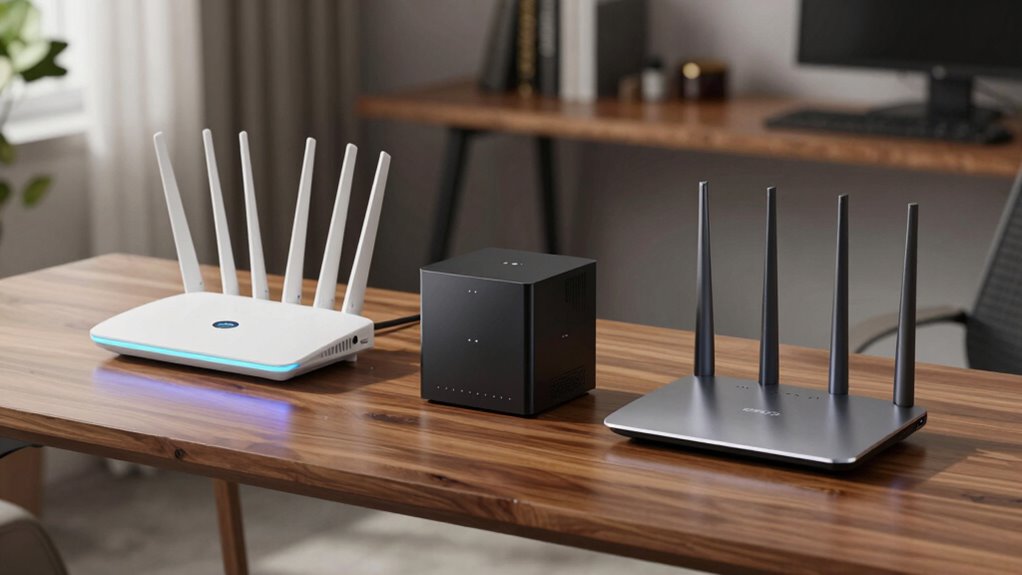

Choosing a WiFi 7 router for your home office means balancing speed, coverage, and ease of use. The GL.iNet GL-BE9300 Flint 3 stands out for its blazing-fast speeds up to 9 Gbps, ideal for demanding tasks like gaming and streaming. In contrast, the NETGEAR Nighthawk RS90 offers a simpler setup with reliable performance up to 3.6 Gbps, perfect for most users seeking dependable WiFi. For expansive coverage and support for many devices, the TP-Link Deco 7 Pro BE63 provides a mesh system that can cover up to 5,800 sq.ft. However, it requires additional setup effort. Each option comes with tradeoffs—whether in setup complexity, price, or device capacity—so I’ll explain how they compare to help you decide which fits your home office best.

Get smart everyday buys delivered free — and shop member deals
- Fast, free delivery on millions of items
- Access to Prime Big Deal Days deals on October 6–7
- Prime Video, Amazon Music and more included
Key Takeaways
- The fastest speeds are found in high-end tri-band routers like the GL.iNet Flint 3, but they come with more complex setup processes.
- Mesh systems like the TP-Link Deco 7 Pro excel in covering large homes but may require more technical setup and subscriptions for full features.
- Most routers support multiple devices, but real-world speeds and coverage can vary depending on your internet plan and home layout.
- Ease of management varies; some models offer app-based setup, while others might need more technical knowledge.
- Security features are increasingly standard, but premium options include advanced protections like TP-Link HomeShield or NETGEAR Armor.
| GL.iNet GL-BE9300 Flint 3 Tri-Band Wi-Fi 7 Router |  | Best Overall for High-Speed Demands | Wi-Fi Standard: Wi-Fi 7 | Max Speed: 9 Gbps | Coverage: 2000 sq ft | VIEW ON AMAZON | See Our Full Breakdown |
| NETGEAR Nighthawk WiFi 7 Router RS90, Up to 2,000 sq ft, 3.6 Gbps |  | Best for Reliable, Easy Setup | Speed: Up to 3.6 Gbps | Coverage: Up to 2,000 sq ft | Bands: Dual-band | VIEW ON AMAZON | See Our Full Breakdown |
| TP-Link Deco 7 Pro BE63 Tri-Band WiFi 7 Whole Home Mesh System |  | Best for Large Coverage & Device Support | Coverage: 5800 sq ft | Speed: Up to 10 Gbps | Supported Devices: Over 200 | VIEW ON AMAZON | See Our Full Breakdown |
| GL.iNet GL-BE6500 Flint 3e Wi-Fi 7 Router with VPN for Home and Gaming |  | Best for Gaming & Security | Wi-Fi Standard: Wi-Fi 7 | Max Speed: 6.5 Gbps | Coverage: 2500 sq ft | VIEW ON AMAZON | See Our Full Breakdown |
| TP-Link Tri-Band WiFi 7 Router (Archer BE600) |  | Best for Balanced Performance & Features | WiFi Bands: Tri-Band WiFi 7 | Total Bandwidth: 9.7 Gbps | Coverage: 2600 sq ft | VIEW ON AMAZON | See Our Full Breakdown |
| wifi 7 routers for home office | Coverage | Ports |
|---|---|---|
| GL.iNet GL-BE9300 Flint 3 Tri- | 2000 sq ft | — |
| NETGEAR Nighthawk WiFi 7 Route | Up to 2,000 sq ft | One 2.5 G WAN, four 1 G LAN |
| TP-Link Deco 7 Pro BE63 Tri-Ba | 5800 sq ft | 4 x 2.5G WAN/LAN, 1 x USB 3.0 |
| GL.iNet GL-BE6500 Flint 3e Wi- | 2500 sq ft | — |
| TP-Link Tri-Band WiFi 7 Router | 2600 sq ft | 1 x 10 Gbps WAN, 1 x 2.5 Gbps WAN, 3 x 2.5 Gbps LAN |
More Details on Our Top Picks
GL.iNet GL-BE9300 Flint 3 Tri-Band Wi-Fi 7 Router
The GL.iNet GL-BE9300 Flint 3 stands out for delivering speeds up to 9 Gbps, making it ideal for users who need maximum performance for gaming, streaming, or handling large files. Its tri-band setup and advanced MLO technology help reduce latency and improve coverage, especially in busy networks with many devices. Compared to other options, it offers more raw speed but requires a more involved setup process. Firmware updates are essential for maintaining performance, and its extensive port selection supports multiple wired connections. This router best suits tech-savvy users who demand top-tier speed and are comfortable with a detailed setup process.
Pros:- Ultra-fast Wi-Fi 7 speeds up to 9 Gbps for smooth gaming and streaming
- Wide coverage of up to 2,000 sq ft with reliable connectivity
- Supports multiple devices with high storage capacity and advanced tech
Cons:- Complex setup requiring detailed instructions
- Speed may vary based on ISP and environment
- Firmware updates needed for optimal performance
Best for: Power users needing maximum speed and low latency for demanding tasks
Not ideal for: Casual users or those seeking plug-and-play simplicity
- Wi-Fi Standard:Wi-Fi 7
- Max Speed:9 Gbps
- Coverage:2000 sq ft
- VPN Speed:680 Mbps
- Storage:DDR4 1GB / eMMC 8GB
- Number of Ports:5 x 2.5G
Our verdict“This router is perfect for power users who need blazing-fast speeds and are comfortable with advanced setup.”
NETGEAR Nighthawk WiFi 7 Router RS90, Up to 2,000 sq ft, 3.6 Gbps
The NETGEAR Nighthawk RS90 offers a straightforward setup process with reliable WiFi 7 performance up to 3.6 Gbps. Its dual-band system covers up to 2,000 sq ft, making it suitable for most standard home office needs. The Nighthawk app simplifies management, enabling quick adjustments and security controls. Its multi-gig wired ports support high-speed connections, but real-world wireless speeds depend heavily on your device and plan. This router is a solid choice for users who prioritize ease of use, reliable performance, and integrated security, though it might not satisfy those needing the absolute fastest speeds or very large coverage.
Pros:- High-speed WiFi 7 performance for multiple devices
- Easy setup and management via mobile app
- Multi-gig wired connection support
Cons:- Real-world speeds depend on device and ISP plan
- May require mesh systems for larger homes
- Security subscription needed after free trial
Best for: Home office users seeking reliable WiFi with simple management
Not ideal for: Power users requiring ultra-high speeds or large coverage
- Speed:Up to 3.6 Gbps
- Coverage:Up to 2,000 sq ft
- Bands:Dual-band
- Ports:One 2.5 G WAN, four 1 G LAN
- Security:NETGEAR Armor (subscription)
Our verdict“Ideal for users who want dependable, fast WiFi with minimal fuss and straightforward management.”
TP-Link Deco 7 Pro BE63 Tri-Band WiFi 7 Whole Home Mesh System
The TP-Link Deco 7 Pro BE63 is designed for expansive coverage, supporting up to 5,800 sq.ft. with a mesh system that handles over 200 devices. Speeds max at 10 Gbps, making it suitable for demanding smart homes and heavy multitasking environments. The setup is more complex, especially for non-technical users, and some features may require a subscription. Its extensive multi-gig ports and advanced security with TP-Link HomeShield make it a top choice for large homes or offices needing seamless, high-capacity connectivity across many devices.
Pros:- Extensive coverage up to 5,800 sq ft
- Supports over 200 devices simultaneously
- Ultra-fast speeds up to 10 Gbps with mesh network
Cons:- Requires a separate modem
- Setup can be complex for non-technical users
- Premium features might need a subscription
Best for: Large homes or offices with many devices needing wide coverage
Not ideal for: Small spaces or users seeking simple, single-router solutions
- Coverage:5800 sq ft
- Speed:Up to 10 Gbps
- Supported Devices:Over 200
- Ports:4 x 2.5G WAN/LAN, 1 x USB 3.0
- Security:TP-Link HomeShield
Our verdict“Best suited for large spaces with many connected devices, willing to manage a more involved setup.”
GL.iNet GL-BE6500 Flint 3e Wi-Fi 7 Router with VPN for Home and Gaming
The GL.iNet GL-BE6500 Flint 3e offers speeds up to 6.5 Gbps, making it a strong choice for gaming and home office use. Its coverage of around 2,500 sq ft and support for over 100 devices make it versatile, while VPN support and advanced security features appeal to privacy-conscious users. Setup is straightforward for those familiar with networking, but VPN speeds can vary based on external factors. It balances high performance with security, making it ideal for gamers or users needing strong privacy protections.
Pros:- Supports ultra-fast speeds up to 6.5 Gbps
- Good coverage for homes and offices
- Includes VPN, parental controls, and ad blocking
Cons:- VPN speeds depend on external factors
- Setup may require some technical knowledge
- Limited to 100+ devices
Best for: Gaming, security-focused users, and small to medium-sized offices
Not ideal for: Users needing maximum speed or very large coverage
- Wi-Fi Standard:Wi-Fi 7
- Max Speed:6.5 Gbps
- Coverage:2500 sq ft
- Device Capacity:Over 100 devices
- VPN Speed:Up to 1100 Mbps
Our verdict“A balanced router for high-speed gaming and secure browsing, suitable for smaller spaces.”
TP-Link Tri-Band WiFi 7 Router (Archer BE600)
The TP-Link Archer BE600 offers a powerful tri-band WiFi 7 setup with total bandwidth reaching 9.7 Gbps. It covers up to 2,600 sq ft and supports multiple wired and wireless devices. Its user-friendly setup via the Tether app and advanced security features, including parental controls and firewall, make it a versatile choice for busy home offices. However, its feature set might be overwhelming for casual users, and its size demands ample space for placement. It strikes a good balance between speed, coverage, and management tools for most users.
Pros:- High-speed WiFi 7 with 9.7 Gbps total bandwidth
- Multiple multi-gig ports for wired connections
- Advanced security and easy setup
Cons:- Complex features may overwhelm casual users
- Premium price point
- Large size may need dedicated space
Best for: Users seeking high-speed, feature-rich WiFi for busy home offices
Not ideal for: Those preferring minimal setup or very small spaces
- WiFi Bands:Tri-Band WiFi 7
- Total Bandwidth:9.7 Gbps
- Coverage:2600 sq ft
- Ports:1 x 10 Gbps WAN, 1 x 2.5 Gbps WAN, 3 x 2.5 Gbps LAN
- Security Features:TP-Link HomeShield
Our verdict“An excellent all-rounder for tech-savvy users who want speed, coverage, and security in one package.”
How We Picked
Our selection process focused on routers that support WiFi 7 for home offices, prioritizing speed, coverage, ease of use, and security. We compared technical specs, real-world performance tradeoffs, and setup complexity. Devices were chosen for their relevance to demanding home office environments, with a mix of mesh systems, high-speed routers, and those offering multi-device support. Price points ranged from budget-friendly to premium, ensuring options for different needs and budgets. Our goal was to present a balanced view to help buyers match their specific workspace demands with the best WiFi 7 routers available in 2026.
Factors to Consider When Choosing Wifi 7 Routers For Home Offices
Choosing the right WiFi 7 router for your home office involves balancing several factors. First, consider your coverage needs—do you have a large space or multiple floors? Next, evaluate your speed requirements—are you streaming 4K, gaming, or handling large data transfers? Security features and ease of management are also essential, especially if multiple devices or smart home integrations are involved. Finally, your budget will influence whether you opt for high-end mesh systems or simpler, single-router setups. This guide will help you weigh these factors to find the best fit.Speed and Performance
For demanding tasks like 4K streaming, gaming, or large file transfers, look for routers offering speeds of 6 Gbps or higher. The GL.iNet Flint 3 provides the fastest performance, but if your plan or device support is limited, then a more modest speed like 3.6 Gbps from the NETGEAR RS90 may suffice. Remember, real-world speeds depend on your ISP plan and device capabilities.
Coverage and Scalability
If your home office is large or spans multiple floors, a mesh system like the TP-Link Deco 7 Pro ensures seamless coverage up to 5,800 sq ft. For smaller spaces, a single high-performance router may be enough. Keep in mind that adding mesh nodes can improve coverage but also adds complexity and cost.
Ease of Use and Management
Some routers, especially from NETGEAR and TP-Link, offer intuitive app-based setup and management, making configuration straightforward for most users. Others, like the GL.iNet Flint 3, may require more technical skill. Consider your comfort level with networking when choosing.
Security and Features
Enhanced security options, including parental controls, firewalls, and VPN support, are standard in many models. The TP-Link Archer BE600 offers a robust security suite, while the GL.iNet GL-BE6500 emphasizes VPN and privacy features for security-conscious users. Subscription requirements vary and should be factored into your decision.
Frequently Asked Questions
Do I need a WiFi 7 router for my home office?
If you have multiple high-bandwidth devices, large files, or stream 4K content regularly, a WiFi 7 router can provide faster speeds and lower latency, improving your overall experience. For basic browsing or light productivity, a WiFi 6E or even WiFi 5 router may be sufficient, making WiFi 7 more of a future-proof choice for demanding setups.
Is a mesh WiFi system better for large homes?
Yes, mesh systems like the TP-Link Deco 7 Pro are designed to cover large areas seamlessly, eliminating dead zones. They are ideal if your home has multiple floors or thick walls that disrupt signal. However, they typically come with higher setup complexity and cost compared to single routers.
Are WiFi 7 routers easy to set up?
Setup complexity varies; many brands offer mobile apps that simplify the process, especially for single routers like the NETGEAR RS90 or TP-Link BE600. Mesh systems may require additional configuration but often include step-by-step guides. Advanced users might prefer manual setup for more control.
Will WiFi 7 improve my gaming experience?
Absolutely, WiFi 7’s high speeds and advanced technologies like MLO and OFDMA significantly reduce latency and jitter, which is crucial for gaming. Routers like the GL.iNet Flint 3 are designed to handle intense gaming traffic, though your internet plan and device compatibility also play a role.
How important are security features in a home office router?
Security features protect your network from threats and unauthorized access, which is especially important if you handle sensitive work data. Many newer routers include parental controls, firewalls, and VPN support. Premium security services like TP-Link HomeShield or NETGEAR Armor add extra layers of protection, making them worthwhile investments for security-conscious users.
Conclusion
For users who prioritize maximum speed and cutting-edge performance, the GL.iNet Flint 3 is the best fit, provided you’re comfortable with setup complexity. Those seeking a reliable, straightforward option will find the NETGEAR Nighthawk RS90 meets their needs without fuss. Large home owners or those with many devices should consider the TP-Link Deco 7 Pro mesh system, despite its setup challenges. Finally, if you want a balanced mix of speed, security, and features in a manageable package, the TP-Link Archer BE600 offers strong performance for most home offices. Your choice depends on your specific coverage, speed, and management priorities.
Fall Picks
fall essentials
As an affiliate, we earn on qualifying purchases.