If you need a device for detailed editing, multitasking, or running demanding software, a business laptop is likely the better fit for your digital nomad workdays. It offers a full keyboard, larger screen, and reliable power, making longer work sessions comfortable. On the other hand, if your tasks are quick notes, browsing, or on-the-go communication, a lightweight tablet provides portability and convenience. To discover which device matches your workflow best, keep exploring the options below.
Key Takeaways
- Business laptops support extensive multitasking, complex software, and comfortable long-duration use, ideal for productivity-focused workdays.
- Tablets offer superior portability and quick access, suitable for casual browsing, note-taking, and on-the-go tasks.
- Laptops have better ergonomic features and battery life for prolonged work sessions in fixed locations.
- Tablets are lightweight and versatile, but may require accessories for extended typing or detailed tasks.
- Workflow compatibility and cloud integration preferences determine whether a laptop or tablet better suits a digital nomad’s needs.

When choosing between a business laptop and a tablet, understanding their core differences can help you make the right decision for your needs. As a digital nomad, your work environment is constantly changing, and your device choice can considerably impact productivity. Business laptops generally offer a full keyboard, larger screens, and more robust processing power, making them ideal for tasks that require extensive typing, multitasking, and running complex software. Tablets, on the other hand, are lightweight, portable, and perfect for quick edits, browsing, and on-the-go communication. They excel in scenarios where mobility is a priority, but they might fall short when it comes to heavy-duty work.
Choosing between a business laptop and a tablet depends on your work needs, mobility, and ergonomic preferences.
One key consideration is how each device integrates with cloud computing — an essential tool for remote workers. Business laptops typically provide more seamless access to cloud services, allowing you to store, sync, and retrieve files easily across platforms. This guarantees your work remains accessible, no matter where you’re working from. Tablets, while increasingly capable of supporting cloud apps, sometimes limit the depth of multitasking and file management, especially if they rely on mobile app versions or simplified interfaces. If your workflow depends heavily on cloud computing for collaboration and file sharing, a laptop might serve you better.
Ergonomic design is another critical factor. Laptops are designed with comfort in mind, featuring adjustable screens and keyboards that support prolonged use. This ergonomic setup reduces fatigue during long work sessions. Tablets tend to be more compact and may require accessories like stands or external keyboards for extended typing, which can compromise portability and convenience. If your work involves long hours at a desk or in a fixed location, a laptop’s ergonomic advantages can make a considerable difference in your comfort and productivity. Additionally, considering device durability can be important for those frequently on the move, as some laptops are built with rugged features to withstand rough conditions. Moreover, the battery life of each device can significantly influence your ability to work efficiently in various environments without frequent recharging. Choosing a device with adequate processing power ensures that demanding applications run smoothly, further supporting your productivity. Incorporating crochet or knitting accessories into your gear setup can also provide a creative break during work sessions, especially if you enjoy crafting during downtime. Furthermore, the integration of ergonomic accessories like external mice or adjustable stands can enhance comfort during prolonged use. Ultimately, your choice hinges on how you balance portability, task complexity, and comfort. If your workdays involve detailed document editing, data analysis, or software that demands a full keyboard and a stable environment, a business laptop is likely the better fit. Its ergonomic design and superior processing capabilities support sustained work sessions. Conversely, if your schedule calls for quick notes, casual browsing, or working in diverse locations with limited space, a tablet’s lightness and ease of use make it an excellent companion. Consider how each device aligns with your workflow, the importance of cloud computing access, and your ergonomic needs to determine which fits your digital nomad lifestyle better.

HP Business Laptop with Microsoft Office 365, 1TB OneDrive and 128GB SSD, 8GB RAM, 4-Core Intel Processor | No Mouse, Fast Response, Long Battery Life, Good Value
【Display】This laptop has a 14-inch LED display with 1366 x 768 (HD) resolution and vivid images to maximize…
As an affiliate, we earn on qualifying purchases.
As an affiliate, we earn on qualifying purchases.
Frequently Asked Questions
What Are the Long-Term Cost Differences Between Laptops and Tablets?
You’ll find that long-term costs for laptops tend to be higher due to their higher initial prices and sometimes more expensive maintenance costs. Tablets usually have lower upfront costs and generally incur fewer maintenance expenses. Pricing trends show tablets are more budget-friendly over time, but laptops may offer better durability for intensive use. Consider your work needs, as tablets might save you money initially, but laptops could be more cost-effective long-term for demanding tasks.
How Do Security Features Compare Between Business Laptops and Tablets?
You’ll find that business laptops often offer more advanced security features like biometric authentication and hardware encryption, making them more secure for sensitive data. Tablets typically include biometric options, such as fingerprint scanners, but may lack thorough hardware encryption. If security is a priority for your work, a business laptop provides stronger, more robust protection, ensuring your information stays safe even on the go.
Can Tablets Replace Laptops for Complex Business Applications?
Think of a tablet as a nimble dancer, perfect for quick moves but not for complex routines. While its touchscreen versatility makes it great for simple tasks, it struggles with advanced business applications. App ecosystem differences mean laptops offer more powerful software options, better suited for heavy-duty work. So, for complex tasks, a tablet can’t fully replace a laptop, but it’s excellent for on-the-go quick tasks.
Which Device Offers Better Battery Life for All-Day Work?
A business laptop generally offers better battery life for all-day work due to superior power efficiency and longer power longevity. You’ll find laptops designed with larger batteries and energy-saving components, enabling you to work uninterrupted for hours. Tablets, while portable and quick to charge, usually have shorter battery life, making them less ideal if your workday extends across many hours without frequent charging.
Are There Compatibility Issues With Software on Tablets Versus Laptops?
You might face some software limitations on tablets compared to laptops, especially with complex or specialized programs. App compatibility can be an issue, as tablets often run mobile versions that lack full features. Laptops typically support a wider range of software, including desktop applications, making them more reliable for work that requires specific tools. If seamless software compatibility is essential, a laptop usually offers a smoother experience for your digital nomad workdays.
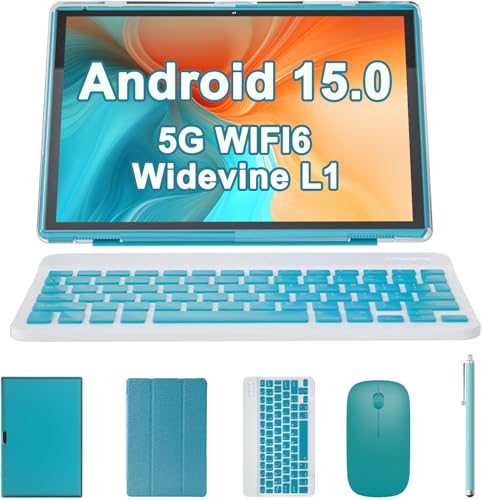
2 in 1 Tablet with Keyboard Case Mouse Stylus, 10 inch Tablet Android 15 Tablets PC, 8GB RAM+32GB ROM Support 1TB Expandable, 6000mAh Battery IPS 10.1" Tab 2MP+8MP Dual Camera WiFi-6 Bluetooth Tableta
【2 in 1 Tablet with Keyboard Mouse And More】This Android 15 tablet package is a perfect combination, 10…
As an affiliate, we earn on qualifying purchases.
As an affiliate, we earn on qualifying purchases.
Conclusion
Choosing between a business laptop and a tablet really comes down to your unique work style, but here’s the twist—you might find that the best device is the one you already own. Sometimes, the most unexpected coincidence is discovering that your current tablet, paired with the right accessories, fits your needs perfectly, or that your trusty laptop adapts seamlessly to your digital nomad lifestyle. In the end, it’s about making your workday smoother, wherever you are.

RAINSMORE Tactical Laptop Bag 17.3 Inch Laptop Briefcase Men Business Computer Bag Large Laptop Case Waterproof Military Shoulder Messenger Bag Work Office Travel, Black
WELL-ORGANIZED LARGE CAPACITY: Designed with over 10 practical pockets, this tactical laptop bag features a padded main compartment…
As an affiliate, we earn on qualifying purchases.
As an affiliate, we earn on qualifying purchases.

SHARECLOUD Android 16 Tablet 10.1 inch Tablet with Octa-Core Processor, 20GB RAM 128GB ROM 1 TB Expandable, 1280×800 HD IPS Touch Screen, GPS, 8H Battery, WiFi 6, BT 5.2, Dual Camera (Gray)
Powerful Performance – Equipped with a T7250 octa-core processor, this tablet effortlessly handles daily tasks such as web…
As an affiliate, we earn on qualifying purchases.
As an affiliate, we earn on qualifying purchases.