When searching for a smart door lock Wi-Fi enabled, the goal is to find a device that combines convenience, security, and seamless smart home integration. The Philips Wi-Fi Smart Lock stands out as the best overall choice for its reliable performance and user-friendly app. The Kwikset Halo offers excellent keyless convenience with a stylish matte black finish, while the eufy Security Smart Lock C220 is favored for its fingerprint access. Buyers face tradeoffs between price, ease of installation, and smart features, so understanding these differences is key. Keep reading for the full breakdown of the top options and what sets them apart.

Get smart everyday buys delivered free with Prime
- Fast, free delivery on millions of items
- Prime Video, Amazon Music and more included
- Member-only deals all year
Key Takeaways
- The best overall smart Wi-Fi lock balances security, ease of use, and smart home compatibility, as exemplified by the Philips Wi-Fi Smart Lock.
- Fingerprint-enabled models like eufy Security C220 provide convenient keyless access but may lack some advanced features of premium locks.
- Higher-priced options such as Schlage Encode often deliver more durable build quality and richer integration options, justifying the premium for many users.
- Ease of installation varies widely; some locks require professional setup, while others are designed for DIY installation with straightforward instructions.
- Many locks now support advanced features like auto-lock and voice assistant compatibility, but these can increase complexity and cost.
| Philips Wi-Fi Smart Lock for Front Door, Fingerprint Keyless Entry, Electronic Keypad Deadbolt, App Remote Control, Auto Lock, Compatible with Alexa and Google |  | Best Overall for Versatile Unlocking and Remote Management | Brand: PHILIPS | Recommended Uses For Product: back door, front door, garage door, side door | Included Components: Exterior assembly, Interior assembly, Keys, Install sets | VIEW ON AMAZON | See Our Full Breakdown |
| eufy Security Smart Lock C220, Fingerprint Keyless Entry Door Lock |  | Best for Long Battery Life and Seamless Ecosystem Integration | Battery Life: 8 months | Batteries: 8 AA batteries | Operating Temperature: -22℉ to 158℉ (-30℃ to 70℃) | VIEW ON AMAZON | See Our Full Breakdown |
| Philips Wi-Fi Smart Front Door Lock Set with Fingerprint and Keyless Entry |  | Best for Easy DIY Installation with Multiple Access Methods | Connectivity: Wi-Fi 2.4GHz | Unlock Methods: Fingerprint, app, passcode, backup keys, voice control | Auto-Lock Timer: 10-180 seconds | VIEW ON AMAZON | See Our Full Breakdown |
| Philips WiFi Keypad Deadbolt with Handle, Built-in WiFi, App Remote Control |  | Best for Fast Biometric Access and Simple Smartphone Control | WiFi Connectivity: 2.4GHz WiFi, no hub needed | Auto-Lock: Yes, customizable from 0-180 seconds | Battery Type: Standard 1.5V alkaline batteries (not included) | VIEW ON AMAZON | See Our Full Breakdown |
| Kwikset Halo Wi-Fi Smart Lock, Keyless Entry Front Door Touchscreen Deadbolt, Matte Black Finish |  | Best for Main Entry with Touchscreen Convenience and Voice Control | Finish: Matte Black | Grade: AAA Certified | UL Listed: Yes | VIEW ON AMAZON | See Our Full Breakdown |
| Schlage Encode Smart WiFi Deadbolt Lock with Century Trim, Matte Black |  | Best Overall for Security and Ease of Use | Color: Matte Black | Connectivity: WiFi | Battery Type: 4 AA batteries | VIEW ON AMAZON | See Our Full Breakdown |
| Philips Fingerprint WiFi Front Door Lock Set with Touchscreen |  | Best for Versatile Access Methods and Multiple Users | Brand: PHILIPS | Model Number: DDL240X-1HW-L | Recommended Uses: Exterior Door, Home Security | VIEW ON AMAZON | See Our Full Breakdown |
| ULTRALOQ Bolt SE Wi-Fi Smart Lock with Matter Over Thread and App Remote Access | 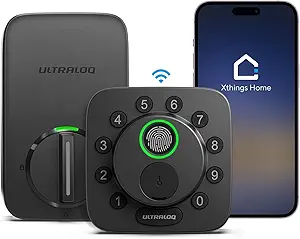 | Best for Ecosystem Integration and Long Battery Life | Fingerprint Capacity: 50 fingerprints | Passcode Capacity: 50 passcodes | Connectivity: Wi-Fi (2.4 GHz), Matter over Thread | VIEW ON AMAZON | See Our Full Breakdown |
| Philips Wi-Fi Smart Deadbolt Lock, Keyless Entry Door Lock |  | Best for Multiple Unlocking Options and Notifications | Brand: PHILIPS | Model Number: DDL242X-1HW | Number of Pieces: 1 | VIEW ON AMAZON | See Our Full Breakdown |
| Wyze Auto-Lock Bolt v2 Fingerprint Keyless Entry Smart Lock |  | Best for Fast, AI-Enhanced Recognition and Budget-Friendly Use | Battery Life: 8 months | Battery Type: AA batteries (8) | Connectivity: Wi-Fi | VIEW ON AMAZON | See Our Full Breakdown |
| smart door lock wi fi enabled | Connectivity |
|---|---|
| Philips Wi-Fi Smart Lock for F | — |
| eufy Security Smart Lock C220 | Wi-Fi (built-in, no bridge required) |
| Philips Wi-Fi Smart Front Door | Wi-Fi 2.4GHz |
| Philips WiFi Keypad Deadbolt w | — |
| Kwikset Halo Wi-Fi Smart Lock | — |
| Schlage Encode Smart WiFi Dead | WiFi |
| Philips Fingerprint WiFi Front | — |
| ULTRALOQ Bolt SE Wi-Fi Smart L | Wi-Fi (2.4 GHz), Matter over Thread |
| Philips Wi-Fi Smart Deadbolt L | Wi-Fi 2.4GHz |
| Wyze Auto-Lock Bolt v2 Fingerp | Wi-Fi |
More Details on Our Top Picks
Philips Wi-Fi Smart Lock for Front Door, Fingerprint Keyless Entry, Electronic Keypad Deadbolt, App Remote Control, Auto Lock, Compatible with Alexa and Google
This Philips model stands out for its wide range of unlocking options, blending fingerprint, PIN code, app control, voice commands, and a physical key—offering maximum flexibility for various users. Compared with the eufy C220, it supports more guest passcodes and detailed activity logs, making it ideal for rental properties or busy households. However, it requires 8 AA batteries and lacks a built-in backup power source, which could leave you locked out during power failures. Connectivity issues reported by some users can also disrupt remote access, highlighting a potential reliability concern. Overall, this lock is perfect for those wanting comprehensive control and easy installation, but less so for users prioritizing backup power or minimal maintenance.
Pros:- Multiple unlocking methods including fingerprint, PIN, app, voice, and key
- Supports up to 100 smart passcodes for guests and rentals
- Remote control and activity logs via Wi-Fi
- Easy to install on most standard doors
Cons:- Requires 8 AA alkaline batteries, which are sold separately
- No built-in battery backup for power failures
- Occasional connectivity issues reported by users
Best for: Homeowners or landlords needing flexible, remote-controlled access with multiple user options
Not ideal for: People living in areas prone to power outages or those seeking a low-maintenance, battery-free solution
- Brand:PHILIPS
- Recommended Uses For Product:back door, front door, garage door, side door
- Included Components:Exterior assembly, Interior assembly, Keys, Install sets
- Model Number:DDL-241-BK
- UPC:850081022251
- Batteries Required:Yes, 8 AA alkaline batteries
Our verdict“This lock offers excellent flexibility and remote management, ideal for tech-savvy homeowners or rental hosts willing to handle battery replacements and occasional connectivity hiccups.”
eufy Security Smart Lock C220, Fingerprint Keyless Entry Door Lock
The eufy C220 excels with an impressive 8-month battery life and multiple unlocking options, including fingerprint, app, keypad, voice, and even Apple Watch, making it highly adaptable for different user preferences. Its quick 15-minute installation, without drilling, makes it particularly appealing for DIY enthusiasts. Compared to the Philips Wi-Fi Smart Lock, it offers a longer-lasting battery and a more straightforward setup, but it relies heavily on Wi-Fi connectivity for remote control, which can be limiting if Wi-Fi fails or fluctuates. Also, its compatibility is primarily with standard US and CA deadbolts, which could restrict installation on non-standard doors. This pick makes the most sense for users prioritizing longevity and ecosystem integration over ultra-wide unlocking options.
Pros:- Multiple unlocking options including fingerprint, app, keypad, and voice control
- Battery lasts around 8 months with normal use
- Easy 15-minute installation without drilling
- Integrates smoothly with the eufy security ecosystem
Cons:- Battery life can vary with usage intensity
- Requires Wi-Fi for remote control—offline use limits functionality
- Limited compatibility with non-US/CA deadbolts
Best for: Homeowners seeking a reliable, long-lasting smart lock with ecosystem compatibility
Not ideal for: Residents in areas with inconsistent Wi-Fi or those with non-standard door configurations
- Battery Life:8 months
- Batteries:8 AA batteries
- Operating Temperature:-22℉ to 158℉ (-30℃ to 70℃)
- Waterproof Rating:IP53
- Connectivity:Wi-Fi (built-in, no bridge required)
Our verdict“Ideal for users prioritizing long battery life and seamless ecosystem integration, but less suited for those with inconsistent Wi-Fi or non-standard doors.”
Philips Wi-Fi Smart Front Door Lock Set with Fingerprint and Keyless Entry
This Philips upgrade emphasizes ease of use, with multiple unlocking options like fingerprint, keypad, app, backup keys, and voice control, making it versatile for households with varying tech comfort levels. Its real-time status updates and temporary code generation provide added security and convenience, especially for managing guests. Compared to the eufy C220, it offers more flexible access options but requires Wi-Fi for remote features, and batteries are not included, adding to setup costs. Its waterproof rating IP53 makes it suitable for outdoor use, but potential compatibility issues with non-standard doors could pose installation challenges. This lock is best for DIYers who want flexible, remote-enabled access without complex installation.
Pros:- Easy DIY installation with included instructions
- Multiple unlocking options for convenience and security
- Remote access and activity notifications via app
- Generates temporary, time-sensitive access codes
Cons:- Batteries not included, need to purchase separately
- Requires Wi-Fi connection for remote features
- Potential compatibility issues with non-standard doors
Best for: DIY homeowners wanting flexible, remote-enabled smart lock with multiple unlocking options
Not ideal for: Users with non-standard door setups or those unwilling to source batteries separately
- Connectivity:Wi-Fi 2.4GHz
- Unlock Methods:Fingerprint, app, passcode, backup keys, voice control
- Auto-Lock Timer:10-180 seconds
- Battery:4 AA batteries (not included)
- Door Compatibility:Standard US doors, cross bore 1-1/2″ or 2-1/8″, door thickness 1-3/8″ to 2″
- Waterproof Rating:IP53
Our verdict“Best suited for DIY owners seeking versatile, remotely manageable access with straightforward installation, provided they can handle battery sourcing.”
Philips WiFi Keypad Deadbolt with Handle, Built-in WiFi, App Remote Control
This Philips keypad deadbolt emphasizes rapid biometric unlocking with a 0.3-second fingerprint scan, making it ideal for quick, touchless entry. Its built-in Wi-Fi allows remote locking and unlocking, with support for PIN codes, app control, and voice commands, providing flexible access management. Compared to the other Philips models, it integrates a handle set for easier manual entry, but it’s primarily designed for right-opening doors and relies on standard batteries, which are not included. Its auto-lock feature can be customized, but manual activation in the app is necessary, which could be a minor inconvenience. This lock suits busy households or commercial settings where speed and ease of access matter most.
Pros:- Fast fingerprint access (0.3 seconds)
- Remote management via smartphone app
- Supports PIN code, voice commands, and auto-lock
- Easy DIY installation with handle included
Cons:- Batteries not included, need to purchase separately
- Designed mainly for right-opening doors
- Auto-lock requires manual setup in the app
Best for: Families or commercial users needing fast, biometric access combined with remote control features
Not ideal for: Users with non-standard or left-opening doors, or those looking for a more traditional deadbolt without biometric features
- WiFi Connectivity:2.4GHz WiFi, no hub needed
- Auto-Lock:Yes, customizable from 0-180 seconds
- Battery Type:Standard 1.5V alkaline batteries (not included)
- Fingerprint Speed:0.3 seconds
- Handle Set Included:Yes
- Door Thickness Compatibility:1-3/8″ to 1-3/4″
Our verdict“Excellent for users wanting quick biometric access combined with remote control, especially in high-traffic or commercial environments.”
Kwikset Halo Wi-Fi Smart Lock, Keyless Entry Front Door Touchscreen Deadbolt, Matte Black Finish
The Kwikset Halo combines a sleek matte black finish with a user-friendly touchscreen keypad, making it a strong choice for front doors. Its compatibility with Alexa and Google, along with app control and guest sharing, matches the feature set of the Philips Wi-Fi Lock but with a more polished interface. Installation is straightforward, with adjustable backset for different door setups. Compared with the Philips model, it offers a more integrated smart home experience, but it requires Wi-Fi for full functionality and may need periodic battery swaps—battery life can vary based on usage. Its elegant design makes it a good choice for style-conscious homeowners who want reliable remote control and voice command support.
Pros:- Remote lock/unlock and activity monitoring via app
- Supports voice commands with Alexa and Google Home
- Easy DIY installation with adjustable fit
- Elegant matte black finish
Cons:- Requires Wi-Fi for full features
- Battery life may require periodic replacements
- Limited to compatible door thicknesses
Best for: Homeowners wanting a stylish, easy-to-operate front door lock with smart voice control and remote access
Not ideal for: Users seeking a lock with extensive biometric options or those with non-standard door dimensions
- Finish:Matte Black
- Grade:AAA Certified
- UL Listed:Yes
- Wi-Fi Enabled:Yes
- No Hub Required:Yes
- App Control:Yes
- Backset Adjustment:2-1/8″ to 2-3/4″
- Door Thickness:1-3/8″ to 1-3/4″
Our verdict“This lock offers a stylish, user-friendly interface for main entry points, suitable for design-conscious users who value remote and voice control.”
Schlage Encode Smart WiFi Deadbolt Lock with Century Trim, Matte Black
The Schlage Encode stands out for its high security rating, ease of installation, and integration with popular voice assistants like Alexa and Google Home. Compared with the ULTRALOQ Bolt SE, it offers a more straightforward setup and a more established security reputation, though its battery life can demand frequent replacements if used heavily. Its built-in alarm adds an extra layer of security, and the app provides comprehensive remote control. However, it’s limited to standard door sizes and backset options, and relies heavily on WiFi, which could be a drawback in areas with unstable internet. This lock is best suited for homeowners prioritizing security and simple installation without sacrificing smart features.
Pros:- High security rating with BHMA certification
- Easy DIY installation with no hardwiring
- Works seamlessly with Alexa and Google Home for voice commands
- Built-in customizable alarm for added security
Cons:- Battery life may require frequent replacement with heavy use
- Limited compatibility with non-standard door sizes
- Requires WiFi connection for full remote features
Best for: Homeowners seeking a secure, reliable Wi-Fi enabled lock with easy setup and voice assistant integration
Not ideal for: Renters or those with irregular WiFi connections, as the lock’s full functionality depends on stable internet
- Color:Matte Black
- Connectivity:WiFi
- Battery Type:4 AA batteries
- Battery Life:Up to 6 months
- Door Thickness:1-3/8 in to 1-3/4 in
- Backset:2-3/8 in or 2-3/4 in
- Alarm:Built-in, customizable
- Security Rating:Highest residential BHMA
Our verdict“This lock is ideal for users who want a high-security, easy-to-install Wi-Fi lock with voice control, but they should be prepared for potential battery replacements.”
Philips Fingerprint WiFi Front Door Lock Set with Touchscreen
The Philips Fingerprint WiFi Lock offers a broad range of unlocking options, including fingerprint, PIN, key, and app control, making it highly flexible for families or shared households. Unlike the ULTRALOQ Bolt SE, which emphasizes long battery life and weather resistance, this model excels in user management with support for up to 50 fingerprints and a touchscreen interface. Its remote Wi-Fi access enables control from anywhere, and voice assistant compatibility adds convenience. The main tradeoff is the lack of an auto-lock sensor, which means users must remember to lock manually after use. It’s best suited for those who need multiple access options and ease of use, especially in settings with numerous users.
Pros:- Multiple unlocking options including fingerprint, PIN, key, and app control
- Supports up to 50 fingerprints for quick access
- Remote Wi-Fi control for convenience
- Voice assistant compatibility with Alexa and Google Assistant
Cons:- No built-in auto-lock sensor, requiring manual locking
- Door must be fully closed for auto-lock to engage
- Optional exterior screw could require additional drilling
Best for: Families or shared households needing multiple access methods and guest management
Not ideal for: Users seeking auto-lock features or in environments with unstable WiFi, as it lacks auto-lock sensors and requires 2.4GHz Wi-Fi
- Brand:PHILIPS
- Model Number:DDL240X-1HW-L
- Recommended Uses:Exterior Door, Home Security
- Number of Pieces:1
- Included Components:2 Door Handles, AA Batteries x8, Mounting Screws & Hardware, WiFi Smart Lock, User Manual
- UPC:850071183511
Our verdict“This lock suits households with multiple users and a need for versatile access, but it relies on Wi-Fi stability and manual locking habits.”
ULTRALOQ Bolt SE Wi-Fi Smart Lock with Matter Over Thread and App Remote Access
The ULTRALOQ Bolt SE excels in integrating with emerging smart home ecosystems thanks to its support for Matter over Thread, making it ideal for users with compatible smart hubs. Its long battery life of 18 months and weather-resistant zinc alloy build make it suitable for outdoor use, outperforming the Wyze Bolt in durability and power efficiency. While it requires a Matter hub for remote access via Thread, it offers multiple unlocking options including fingerprint, passcodes, app, and mechanical keys. The absence of a door sensor might be a drawback for those wanting full automation, and it supports only 2.4 GHz Wi-Fi, limiting connectivity options in some setups. This lock is perfect for tech-savvy users seeking seamless ecosystem integration and durability.
Pros:- Supports multiple access methods including fingerprint, passcodes, app, and mechanical keys
- Long battery life of 18 months reduces maintenance
- Supports Matter over Thread for seamless smart home integration
- Weather-resistant IP65 for outdoor durability
Cons:- Requires a Matter hub for remote Wi-Fi control
- Limited to 2.4 GHz Wi-Fi networks
- Door sensor not included for auto-lock or open/close detection
Best for: Smart home enthusiasts with Matter-compatible hubs seeking a durable, ecosystem-friendly lock
Not ideal for: Users without a Matter hub or in environments with unstable Wi-Fi, as it needs a hub for remote operation
- Fingerprint Capacity:50 fingerprints
- Passcode Capacity:50 passcodes
- Connectivity:Wi-Fi (2.4 GHz), Matter over Thread
- Battery Life:Up to 18 months
- Weather Resistance:IP65 Waterproof
- Material:Zinc alloy
- Auto Lock:Yes
- Installation Time:10 minutes
Our verdict“This lock is ideal for those invested in Matter-compatible systems looking for durable, long-lasting smart security.”
Philips Wi-Fi Smart Deadbolt Lock, Keyless Entry Door Lock
The Philips Wi-Fi Smart Deadbolt offers a comprehensive set of unlocking methods—app, fingerprint, passcodes, physical key, and voice control—making it highly flexible for various users. It compares favorably to the Wyze Bolt v2, which emphasizes speed and AI recognition, by providing detailed real-time notifications and remote management. Its auto-lock and away mode features add security, but the batteries are not included, which can be an inconvenience for quick setup. The lock supports only 2.4 GHz Wi-Fi, limiting connectivity in some cases. This model fits best for users who want multiple access options and real-time alerts, especially in households with varying tech preferences.
Pros:- Multiple unlocking options including app, fingerprint, passcodes, and voice control
- Remote access with real-time notifications
- Auto-lock and away mode for added security
- Easy DIY installation for most standard doors
Cons:- Batteries not included, requiring additional purchase
- Supports only 2.4 GHz Wi-Fi
- No door sensor for open/close detection
Best for: Users wanting versatile unlocking methods combined with remote control and notifications
Not ideal for: Those with limited Wi-Fi stability or who prefer longer battery life, as batteries are not included and it relies on Wi-Fi for full features
- Brand:PHILIPS
- Model Number:DDL242X-1HW
- Number of Pieces:1
- Included Components:1 x door lock
- Connectivity:Wi-Fi 2.4GHz
- Battery Type:AA alkaline (LR6)
- Supported Voice Assistants:Alexa, Google Assistant
- Locking Features:Auto-lock, Away Mode
Our verdict“This lock is best suited for users wanting flexible access methods with instant remote notifications, but they should be prepared for battery setup and Wi-Fi dependence.”
Wyze Auto-Lock Bolt v2 Fingerprint Keyless Entry Smart Lock
The Wyze Auto-Lock Bolt v2 offers a compelling combination of speed, affordability, and AI-powered recognition, with fingerprint unlocking in just 0.5 seconds. Unlike the ULTRALOQ Bolt SE, which emphasizes ecosystem compatibility and auto-lock features, Wyze focuses on quick access and simple remote control via the Wyze app. Its IP53 rating means it’s suitable for most environments but not fully weatherproof, making it less ideal for harsh outdoor conditions. The 8-month battery life is decent but requires regular replacements, and it depends on Wi-Fi for remote features. This lock is well-suited for budget-conscious users who prioritize fast access and AI learning but don’t need extreme weather resistance or extended battery life.
Pros:- Fast fingerprint recognition in 0.5 seconds
- AI learning improves recognition over time
- Multiple unlocking options including app, keypad, and backup keys
- Remotely manageable via Wyze app
Cons:- Batteries require replacement every 8 months
- Limited weather resistance (IP53)
- Dependent on Wi-Fi for remote features
Best for: Budget-conscious users wanting fast, AI-enhanced fingerprint recognition with remote control
Not ideal for: Extreme outdoor environments or users needing extended battery life, as it needs battery replacements approximately every 8 months
- Battery Life:8 months
- Battery Type:AA batteries (8)
- Connectivity:Wi-Fi
- Material:Tempered glass
- IP Rating:IP53
- Security Grade:BHMA2
- Backup Power:USB-C port
Our verdict“This lock is excellent for users seeking quick, AI-powered access on a budget, but it’s less suited for harsh outdoor conditions or long-term battery independence.”

How We Picked
The products in this roundup were evaluated based on several key criteria: performance reliability, ease of installation, build quality, app functionality, compatibility with smart home systems, and value for price. We prioritized locks that offer consistent Wi-Fi connectivity, straightforward setup, and meaningful security features. The ranking reflects a balance between affordability and premium features, ensuring options suit different budgets and user needs. Our focus was on real-world usability, and we compared each lock’s keyless entry methods, app control, and overall durability to identify the best choices for various types of buyers.| smart door lock wi fi enabled | Connectivity |
|---|---|
| Philips Wi-Fi Smart Lock for F | — |
| eufy Security Smart Lock C220 | Wi-Fi (built-in, no bridge required) |
| Philips Wi-Fi Smart Front Door | Wi-Fi 2.4GHz |
| Philips WiFi Keypad Deadbolt w | — |
| Kwikset Halo Wi-Fi Smart Lock | — |
| Schlage Encode Smart WiFi Dead | WiFi |
| Philips Fingerprint WiFi Front | — |
| ULTRALOQ Bolt SE Wi-Fi Smart L | Wi-Fi (2.4 GHz), Matter over Thread |
| Philips Wi-Fi Smart Deadbolt L | Wi-Fi 2.4GHz |
| Wyze Auto-Lock Bolt v2 Fingerp | Wi-Fi |
Factors to Consider When Choosing Smart Door Lock Wi Fi Enabled
Choosing the right smart door lock with Wi-Fi involves understanding several important factors that influence security, convenience, and compatibility. Beyond basic features, buyers should consider installation complexity, smart home integration, and long-term reliability. Making an informed choice requires balancing your budget with the features that matter most for your lifestyle and home setup. Here are the main factors to keep in mind:Security Features and Build Quality
Look for locks that include strong encryption, tamper alarms, and durable materials like hardened steel or high-quality zinc. A lock with biometric access or multiple methods of entry—such as keypad, fingerprint, and app control—adds layers of security. Cheaper models might skimp on build quality, leading to vulnerabilities or quicker wear, so investing in a reputable brand can pay off in the long run.
Ease of Installation and Compatibility
Some locks are designed for DIY installation, fitting standard door preparations, while others may require professional help. Compatibility with your existing door setup and smart home ecosystem (like Alexa, Google Assistant, or Apple HomeKit) is critical. Verify these details before purchasing to avoid frustration or extra costs down the line.
Connectivity and App Functionality
Stable Wi-Fi connectivity ensures remote control and notifications work reliably. The app’s interface should be intuitive, allowing easy management of access codes, activity logs, and automation features. Be aware that some locks rely on cloud services, which could impact functionality if the service is interrupted or discontinued.
Battery Life and Power Backup
Long-lasting batteries are essential for maintenance-free operation. Consider models with low-battery alerts and backup power options like external USB ports. This ensures the lock remains operational during power outages or battery replacements.
Price and Value
Premium models often offer richer features and more robust security, but they come at a higher cost. Conversely, budget-friendly options may lack some advanced features but still provide reliable basic security. Match your choice to your specific needs and willingness to pay for extras like voice control or integration capabilities.
Frequently Asked Questions
Can I use a smart Wi-Fi door lock if I don’t have a smart home system?
Absolutely. Many Wi-Fi-enabled smart locks operate independently via their dedicated apps and do not require a full smart home setup. They can be controlled remotely through your smartphone, providing added convenience without the need for additional smart home devices. However, integrating with smart assistants can enhance functionality, so consider your future plans if you want voice control or automation features later.
How secure are Wi-Fi smart locks against hacking?
Wi-Fi smart locks employ encryption and security protocols to protect against hacking, but no device is completely invulnerable. Choosing a lock with strong encryption, regular firmware updates, and reputable brand reputation reduces risks. Ensure your home Wi-Fi network has a strong password and enable two-factor authentication if available for added security.
What happens if my Wi-Fi goes out or the internet is down?
Most smart locks include a mechanical key override or local Bluetooth control as a backup, ensuring you can still access your home during internet outages. Some high-end models also have battery power to maintain basic operation. Be sure to check these features if you live in an area prone to connectivity issues or want peace of mind.
Are these locks compatible with all types of doors?
Not all smart locks fit every door. Most are designed for standard deadbolts, but some may require specific door thicknesses or prep work. Always verify the compatibility with your door’s measurements and hardware before purchasing. If your door has unusual dimensions or existing hardware, some customization or professional installation might be necessary.
Is it worth paying extra for a premium smart lock?
Premium models often deliver enhanced security features, better build quality, and more seamless integration with smart home ecosystems. If you prioritize durability, advanced access options, and future-proofing, investing in a higher-end lock can be worthwhile. However, for basic needs, a more affordable model can still provide reliable keyless entry and remote control at a lower cost.
Conclusion
For those seeking the best overall balance of security, ease of use, and smart features, the Philips Wi-Fi Smart Lock remains the top recommendation. Buyers on a budget or new to smart locks should consider the Wyze Auto-Lock Bolt v2 for straightforward functionality at an attractive price. If durability and premium features matter most, the Schlage Encode offers robust build quality and extensive smart home options. For users who want simple installation and basic access, the eufy Security C220 delivers quick setup and reliable fingerprint entry. Ultimately, your choice depends on your specific security needs, smart home setup, and budget.